Enum IconType
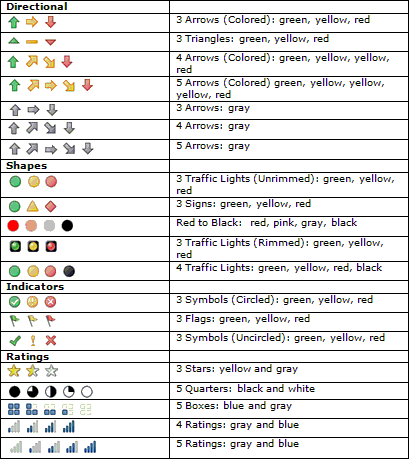
Namespace: DRIT.Spreadsheet
Assembly: DRIT.Spreadsheet.dll
Syntax
public enum IconTypeFields
| Name | Description |
|---|---|
| BlackCircle | Selects the black circle option represented by this icon type value in the workbook format. |
| BlackCircleWithBorder | Selects the black circle with border option represented by this icon type value in the workbook format. |
| BlackCircleWithOneWhiteQuarter | Selects the black circle with one white quarter option represented by this icon type value in the workbook format. |
| BlackCircleWithThreeWhiteQuarters | Selects the black circle with three white quarters option represented by this icon type value in the workbook format. |
| BlackCircleWithTwoWhiteQuarters | Selects the black circle with two white quarters option represented by this icon type value in the workbook format. |
| BlackTrafficLight | Selects the black traffic light option represented by this icon type value in the workbook format. |
| FourFilledBoxes | Selects the four filled boxes option represented by this icon type value in the workbook format. |
| GoldStar | Selects the gold star option represented by this icon type value in the workbook format. |
| GrayCircle | Selects the gray circle option represented by this icon type value in the workbook format. |
| GrayDownArrow | Selects the gray down arrow option represented by this icon type value in the workbook format. |
| GrayDownRightArrow | Selects the gray down right arrow option represented by this icon type value in the workbook format. |
| GrayRightArrow | Selects the gray right arrow option represented by this icon type value in the workbook format. |
| GrayUpArrow | Selects the gray up arrow option represented by this icon type value in the workbook format. |
| GrayUpRightArrow | Selects the gray up right arrow option represented by this icon type value in the workbook format. |
| GreenCheck | Selects the green check option represented by this icon type value in the workbook format. |
| GreenCheckSymbol | Selects the green check symbol option represented by this icon type value in the workbook format. |
| GreenCircle | Selects the green circle option represented by this icon type value in the workbook format. |
| GreenFlag | Selects the green flag option represented by this icon type value in the workbook format. |
| GreenRimmedTrafficLight | Selects the green rimmed traffic light option represented by this icon type value in the workbook format. |
| GreenTrafficLight | Selects the green traffic light option represented by this icon type value in the workbook format. |
| GreenUpArrow | Selects the green up arrow option represented by this icon type value in the workbook format. |
| GreenUpTriangle | Selects the green up triangle option represented by this icon type value in the workbook format. |
| HalfGoldStar | Selects the half gold star option represented by this icon type value in the workbook format. |
| OneFilledBox | Selects the one filled box option represented by this icon type value in the workbook format. |
| PinkCircle | Selects the pink circle option represented by this icon type value in the workbook format. |
| RedCircle | Selects the red circle option represented by this icon type value in the workbook format. |
| RedCircleWithBorder | Selects the red circle with border option represented by this icon type value in the workbook format. |
| RedCross | Selects the red cross option represented by this icon type value in the workbook format. |
| RedCrossSymbol | Selects the red cross symbol option represented by this icon type value in the workbook format. |
| RedDiamond | Selects the red diamond option represented by this icon type value in the workbook format. |
| RedDownArrow | Selects the red down arrow option represented by this icon type value in the workbook format. |
| RedDownTriangle | Selects the red down triangle option represented by this icon type value in the workbook format. |
| RedFlag | Selects the red flag option represented by this icon type value in the workbook format. |
| RedRimmedTrafficLight | Selects the red rimmed traffic light option represented by this icon type value in the workbook format. |
| RedTrafficLight | Selects the red traffic light option represented by this icon type value in the workbook format. |
| SignalMeterWithFourFillBars | Selects the signal meter with four fill bars option represented by this icon type value in the workbook format. |
| SignalMeterWithNoFillBar | Selects the signal meter with no fill bar option represented by this icon type value in the workbook format. |
| SignalMeterWithOneFillBar | Selects the signal meter with one fill bar option represented by this icon type value in the workbook format. |
| SignalMeterWithThreeFillBars | Selects the signal meter with three fill bars option represented by this icon type value in the workbook format. |
| SignalMeterWithTwoFillBars | Selects the signal meter with two fill bars option represented by this icon type value in the workbook format. |
| SilverStar | Selects the silver star option represented by this icon type value in the workbook format. |
| ThreeFilledBoxes | Selects the three filled boxes option represented by this icon type value in the workbook format. |
| TwoFilledBoxes | Selects the two filled boxes option represented by this icon type value in the workbook format. |
| WhiteCircleWithBlackBorder | Selects the white circle with black border option represented by this icon type value in the workbook format. |
| YellowCircle | Selects the yellow circle option represented by this icon type value in the workbook format. |
| YellowDash | Selects the yellow dash option represented by this icon type value in the workbook format. |
| YellowDownRightArrow | Selects the yellow down right arrow option represented by this icon type value in the workbook format. |
| YellowExclamation | Selects the yellow exclamation option represented by this icon type value in the workbook format. |
| YellowExclamationSymbol | Selects the yellow exclamation symbol option represented by this icon type value in the workbook format. |
| YellowFlag | Selects the yellow flag option represented by this icon type value in the workbook format. |
| YellowRightArrow | Selects the yellow right arrow option represented by this icon type value in the workbook format. |
| YellowRimmedTrafficLight | Selects the yellow rimmed traffic light option represented by this icon type value in the workbook format. |
| YellowTrafficLight | Selects the yellow traffic light option represented by this icon type value in the workbook format. |
| YellowTriangle | Selects the yellow triangle option represented by this icon type value in the workbook format. |
| YellowUpRightArrow | Selects the yellow up right arrow option represented by this icon type value in the workbook format. |
| ZeroFilledBoxes | Selects the zero filled boxes option represented by this icon type value in the workbook format. |