Animated images
An animated GIF is a sequence of frames on a time dimension. You can inspect it, select a frame to work with, copy a frame to an ordinary bitmap, and save the animation again. The library does not build an animation from separate bitmaps; the source GIF in these examples is encoded by a small helper (AnimatedGifFixture) so the examples need no external file.
The input is a four-frame GIF, 160 × 100 pixels, 0.6 seconds per frame, looping forever: a ball bounces across a field, and one more square appears in the top-left counter in each frame.

AnimationFrames




Counts the frames with GetFrameCount(FrameDimension.Time), selects each one with SelectActiveFrame, and saves it as a PNG.
SelectActiveFrame changes which frame the loaded Image currently shows; new Bitmap(image) then copies that frame into an independent bitmap. The PNGs are still images: they carry no timing or loop count.
internal static void AnimationInspectFrames(ExampleContext context)
{
    string input = context.EnsureAnimationFixture();
    using var image = Image.FromFile(input);
    int frameCount = image.GetFrameCount(FrameDimension.Time);
    Console.WriteLine($"  animation frames: {frameCount}");
    for (int i = 0; i < frameCount; i++)
    {
        image.SelectActiveFrame(FrameDimension.Time, i);
        using var frame = new Bitmap(image);
        frame.Save(context.Path($"AnimationFrames-frame-{i:00}.png"), ImageFormat.Png);
    }
}
PreserveAnimation

Loads the animation and saves it again as a GIF and as a PNG, then reopens both files to count their frames.
Saving a multi-frame image keeps all of its frames: the GIF keeps the frames, delay and loop count, and the PNG is written as an animated PNG, which browsers and many viewers play. The frame counts read back from the written files:
Source frames=4
Saved GIF frames=4
Saved PNG frames=4
Plain PNG readers show only the first frame of an animated PNG. Reopen what you wrote, as this example does, when preserving the animation matters to your workflow.
internal static void PreserveAnimation(ExampleContext c)
{
    string gifPath = c.Path("PreserveAnimation-preserved.gif");
    string pngPath = c.Path("PreserveAnimation-preserved.png");
    int sourceFrames;
    using (var image = Image.FromFile(c.EnsureAnimationFixture()))
    {
        sourceFrames = image.GetFrameCount(FrameDimension.Time);
        image.Save(gifPath, ImageFormat.Gif);
        image.Save(pngPath, ImageFormat.Png);
    }

    // Verify by reopening what was written rather than trusting the source image.
    using var savedGif = Image.FromFile(gifPath);
    using var savedPng = Image.FromFile(pngPath);
    File.WriteAllText(c.Path("PreserveAnimation-animation.txt"),
        $"Source frames={sourceFrames}\n" +
        $"Saved GIF frames={savedGif.GetFrameCount(FrameDimension.Time)}\n" +
        $"Saved PNG frames={savedPng.GetFrameCount(FrameDimension.Time)}\n");
}
ComposeFrames

Draws every frame side by side into a single contact sheet.
The output is one frame high and frame width × frame count wide; frame i is drawn at x = i × frame width. A contact sheet is a convenient way to see the order and the differences between frames, but it is a static image and shows nothing of the timing.
internal static void FrameComposition(ExampleContext c)
{
    using var image = Image.FromFile(c.EnsureAnimationFixture());
    using var output = ExampleSupport.NewCanvas(image.Width * image.GetFrameCount(FrameDimension.Time), image.Height, Color.White);
    using var g = Graphics.FromImage(output);
    for (int i = 0; i < image.GetFrameCount(FrameDimension.Time); i++)
    {
        image.SelectActiveFrame(FrameDimension.Time, i);
        using var frame = new Bitmap(image);
        g.DrawImage(frame, new Rectangle(i * image.Width, 0, image.Width, image.Height));
    }
    ExampleSupport.Save(output, c, "ComposeFrames-frame-composition.png", ImageFormat.Png);
}
ExtractFrames


Saves every frame as its own numbered PNG (ExtractFrames-extracted-frame-00.png to -03.png; frames 0 and 3 are shown).
Selecting frames only changes the in-memory image; the source file is never modified. Use this to feed frames to code that handles a single bitmap at a time.
internal static void ExtractAnimationFrames(ExampleContext c)
{
    using var image = Image.FromFile(c.EnsureAnimationFixture());
    for (int i = 0; i < image.GetFrameCount(FrameDimension.Time); i++)
    {
        image.SelectActiveFrame(FrameDimension.Time, i);
        using var frame = new Bitmap(image);
        ExampleSupport.Save(frame, c, $"ExtractFrames-extracted-frame-{i:00}.png", ImageFormat.Png);
    }
}
AnimatedBanner

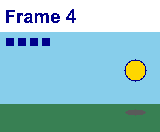
Adds a 32-pixel banner above each frame and labels it Frame 1, Frame 2, and so on (frames 1 and 4 are shown).
The frame is drawn below a white strip on a taller canvas, and DrawString writes the label into the strip. The files are numbered from zero while the labels count from one. The result is a set of separate PNGs, not a new animation, because the library does not assemble one.
internal static void AnimatedBanner(ExampleContext c)
{
    using var image = Image.FromFile(c.EnsureAnimationFixture());
    for (int i = 0; i < image.GetFrameCount(FrameDimension.Time); i++)
    {
        image.SelectActiveFrame(FrameDimension.Time, i);
        using var frame = new Bitmap(image);
        using var banner = ExampleSupport.NewCanvas(frame.Width, frame.Height + 32, Color.White);
        using var g = Graphics.FromImage(banner);
        g.DrawImage(frame, new Rectangle(0, 32, frame.Width, frame.Height));
        using var font = new DrawingFont(DRIT.Drawing.Text.FontFamily.GenericSansSerif, 14, FontStyle.Bold);
        using var brush = new SolidBrush(Color.DarkBlue);
        g.DrawString($"Frame {i + 1}", font, brush, 4, 6);
        ExampleSupport.Save(banner, c, $"AnimatedBanner-animated-banner-{i:00}.png", ImageFormat.Png);
    }
}